Cool, crisp colour
A slightly blue white balance, punchy saturation and a cyan tint in the shadows, like a CCD sensor.
Photo effectsY2K camera effect
Give your photos the early-2000s compact camera look: cool CCD colours, bright highlights, soft detail and sensor grain. Made on your device, at full size.
Highlights
Digicams were the small digital cameras everyone carried in the early 2000s. Their tiny sensors gave photos a look you can spot straight away: cool, slightly blue colours, highlights that blow out to white, soft detail with crunchy sharpening, and grain in the shadows. This filter recreates that look on any photo.
It runs in your browser, so your photos are never uploaded. Downloads are the same size as the photo you added, with no watermark.
Start with Step 1 below. Add one photo or many. In Step 2, pick a look, adjust it if you like, and drag the divider to compare before and after. In Step 3, download photos one at a time (unlimited) or all together in a ZIP (50 photos a day, free).
One photo or many. The same look is applied to all of them.
Drop photos here
or paste them with Ctrl+V (Cmd+V on Mac)
JPG, PNG or WebP, up to 60 MB each. HEIC (iPhone) only where your browser can open it.
Pick a style and fine-tune it. Drag the divider on the preview to compare before and after.
Getting the filter ready…
0% is your original photo, 100% the full look.
Each control starts at the look's own setting.
Full size, with no watermark. One photo at a time, or all of them in a ZIP.
Free: 50 of 50 photos left today in ZIP downloads · single photo downloads are unlimited
Your photos are processed on this device and never uploaded. Downloads contain no location or camera data.
Digicam filter guide
What the digicam look is, how this filter makes it, and which photos it suits best.
The basics
Compact digital cameras from the early 2000s had small CCD sensors, tiny lenses and simple processing. Together they left a fingerprint on every photo. The filter rebuilds it in four parts.
A slightly blue white balance, punchy saturation and a cyan tint in the shadows, like a CCD sensor.
Bright areas race to pure white and lose their colour, the way a small sensor clips.
A touch of blur from the tiny lens and sensor, then the over-eager sharpening halo cameras added.
Fine grey and colour noise in the shadows, plus an optional on-camera flash and darker corners.
The filter runs in your browser, using your device's graphics chip (or a slower fallback where the browser doesn't offer one). Your photos are never uploaded, there's no queue or account, and every download is the same size as the photo you started with.
Worked example
A flash photo of a cat on a sofa, with the Digicam look at its default settings.
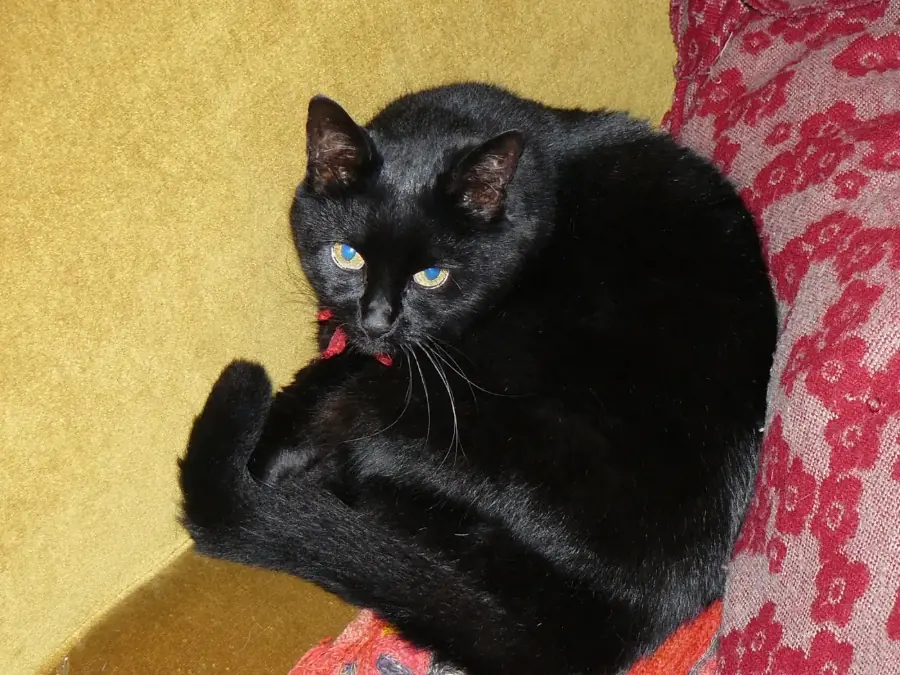
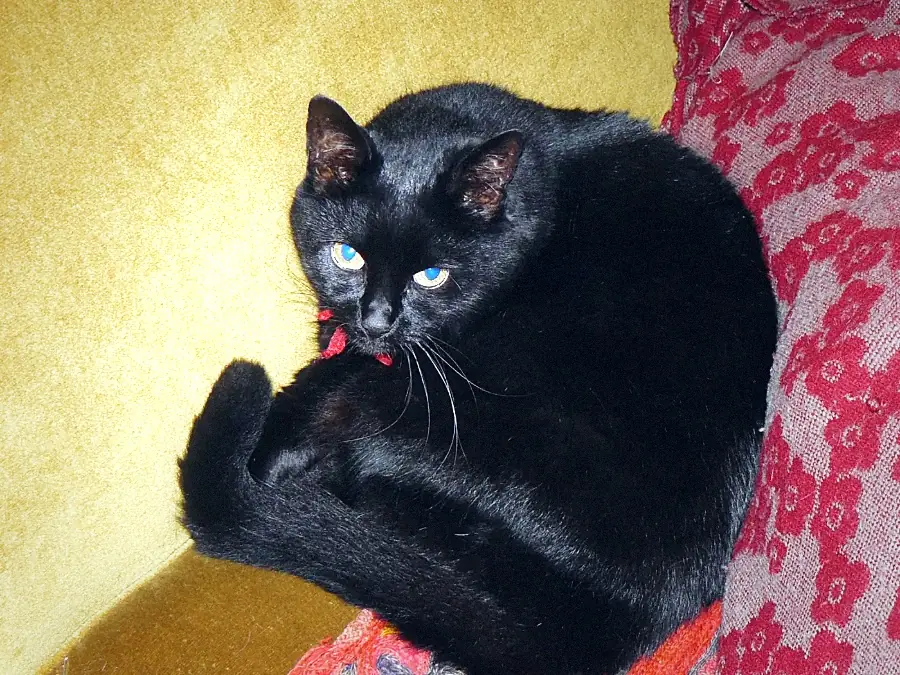
Look at the fur: the shadows turn blue-black, the bright edges get a little crisper, and fine grain shows in the dark areas. The yellow sofa cools slightly. At Strength 50% you'd get half of each change.
Better results
The look comes from flash-lit, everyday snapshots, so that's where it shines.
Faces and fur indoors, especially with the flash on, look the most like the real thing.
Try Night flash: a bright subject in front of a dark room.
Food, streets, friends and trips for a photo dump. Keep the same look across the set.
Strong colours and bright skies show off the cool cast and blown highlights.
Start from the original. A photo that already has a strong filter turns muddy when another look goes on top.
Flat colours and text pick up grain and halos without looking like a photo. Keep it for camera shots.
Night photos already full of noise get even grainier. Lower Grain, or try Washed out.
What you can add
Add up to 20 photos at a time, each up to 60 MB. Single downloads are unlimited; ZIP downloads include up to 50 photos a day for free.
| Format | Support | Good to know |
|---|---|---|
| JPG / JPEG | Supported | Most phone and camera photos. |
| PNG | Supported | Screenshots and edited images. Transparent areas turn white in a JPG download. |
| WebP | Supported | Common for images saved from websites. |
| HEIC / HEIF | Depends on browser | iPhone photos. Safari opens them; elsewhere, convert to JPG first. |
How long it takes depends on your device. In Chrome on a 2022 laptop, a 12 MP photo was filtered and saved in about 0.2 seconds, and a 48 MP photo in under a second. Browsers without WebGL2 use a slower fallback: about 3 seconds for the same 12 MP photo. Phones and older computers take longer.
Know the difference
Both are nostalgic, but they come from different machines and look different up close.
| Digicam (2000s) | Film | |
|---|---|---|
| Colour | Cool and clean, often a little blue | Warmer, richer, sometimes with green or magenta casts |
| Highlights | Clip hard to white | Roll off gently |
| Grain | Fine digital noise, coloured speckles in the shadows | Clumpy, organic grain across the whole picture |
| Detail | Soft, with sharpening halos on edges | Soft and natural, no halos |
For video
This tool works on photos. For video editors, the same colour looks come as LUT files.
Every look on this page as a .cube LUT for CapCut, Premiere Pro, DaVinci Resolve and Final Cut Pro: 33-point files for desktop editors and smaller 17-point files for phone apps.
Everything on this page is free for photos: every look and control, full-size downloads and no watermark. The LUT pack is a separate download for video editors.
Common questions
Quick answers about the digicam look, free use, batches, iPhone photos, privacy and video.
Add your photo above, keep the Digicam look or pick another, and download it. The filter recreates what early-2000s compact cameras did to a photo: a cool white balance, highlights that blow out to white, soft detail with a sharpening halo, and grain in the shadows. You don't need an old camera, an app or an account.
Yes, it's free, and there's no watermark and no sign-up. Downloading photos one at a time is unlimited. Downloading several at once as a ZIP is free for up to 50 photos a day, and that allowance resets at midnight.
Yes. Add up to 20 photos at a time; the look you pick applies to all of them, with the same grain and settings on every photo, so a photo dump looks consistent. Then download them all in one ZIP.
It depends on your browser. Safari can open HEIC photos, so they work there. Chrome, Edge and Firefox usually can't, so convert the photo to JPG first, or set your iPhone to save JPGs (Settings › Camera › Formats › Most Compatible). JPG, PNG and WebP work in every browser.
No. The filter runs in your browser, on your device, so your photos never leave it. Downloads also leave out the photo's hidden data: location (GPS), camera model and the time it was taken are removed.
No. Downloads are the same size as the photo you added, pixel for pixel. JPG is saved at high quality (92%) to keep files small; choose PNG if you want a lossless file, which is several times larger. The preview on screen is smaller, to keep it fast.
This tool works on photos. For video, the Digicam LUT pack has the same colour looks as .cube files for CapCut, Premiere Pro, DaVinci Resolve and Final Cut Pro. A LUT changes colours only, so grain, vignette, glow, flash and softness aren't included; add those with your editor's own tools.
A digicam look is digital: cool, clean colours, highlights that clip hard to white, crunchy sharpening and fine digital noise in the shadows. A film look is warmer and softer, with highlights that roll off gently and grain across the whole picture. Digicam photos feel like the early 2000s; film photos feel older.
No. It's a fixed set of image adjustments (colour, contrast, highlights, blur, sharpening, flash, vignette and noise), applied the same way to every photo. Nothing is generated or invented, and the same settings always give the same result.
Every camera from that era had its own colours and quirks. The filter recreates the look they shared rather than copying one model. Use Warmth, Grain, Flash, Softness and Vignette under Adjust to get closer to the photos you remember.
Related tools
Pull the text or a table out of a photo. These tools also run in your browser, with nothing uploaded.